
Using CAPTCHA to “reduce” spam
Posted : November 12, 2004 at 1:28 pm [America/Los_Angeles]
MT-Blacklist plugin is great tool against “Comment” and “Trackback” spams, but as I had alluded to in my previous entry, it’s pretty reactive in nature. Here’s how MT-Blacklist tries to fight spam:
- Install MT-Blacklist, a content filter plugin. Set a bunch of filters/rules which defines conditions that, if met, will prevent the comment from being submitted. So far so good.
- An “unemployed” and “catabolic” spammer figures out a new way to bypass the existing content filters and spams the blog with nonsensical comments.
- MT (along with MT-Blacklist) sends out an email to the blog author once a new comment (legitimate or otherwise) is posted.
- If it’s a spam, the MT-Blacklist plugin provides a link (as part of the email) that helps the author to delete the spam message and plug the newly found “spam hole” with a couple of mouse-clicks. Really neat stuff!
As cool as MT-Blacklist is, there’s one huge problem. As you can imagine, your site could literally be under a spam attack and you would not have a clue until the next time you open your Inbox or check your blog. Needless to say, I wanted something that would choke these spams at their source - the time when these script kiddies programmatically “spam” my blog entries with nonsensical comments.
Enter CAPTCHA (completely automated
public Turing test to
tell computers and humans apart) and James Seng’s plugin that implement’s CAPTCHA Turing Test. The idea is pretty simple:
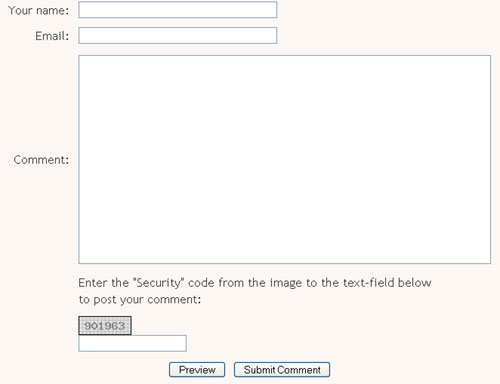
Display an image with a Security Code and force the user to enter that code manually in a text-field before allowing the posting to go through.
The figure above should give readers an idea of what it looks like in action. As you can see, with this plugin in place, programmatically entering a comment becomes somewhat difficult cause the spammer now has to figure out a way to parse the graphic to read the Security Code (or get their hands on the Security Code some other way) to be able to successfully post a spam comment. Ofcourse, if the script kiddies want to manually come to my site and enter a spam, they are more than welcome

So, what’s the catch?
Well, as Scriptygoddess aptly puts it:
…it needs to be said that using a captcha presents some usability issues, as those with graphics disabled or users who have a visual handicap may not be able to comment using the default install. At this time, there is not an enhancement to this plugin to remedy that. This is still an OUTSTANDING solution, just measure the accessibility versus the effectiveness when considering this solution.
Well, I am willing to wait and deal with the “accessibility” challenge for now as I really want to put a serious dent on this “comment spam” nonsense.
Note to myself:
Hunt (or invent) an accessible solution to this problem without forcing users to register.
- Anand
Category: Services and Software