
Fighting Comment and Trackback Spam..
Posted : November 9, 2004 at 5:02 pm [America/Los_Angeles]
Don’t ask me why I did not do it sooner. I mean, protecting my blog from spammers. If you’ve no clue what I am talking about it, I am glad you did not notice it

To the uninitiated, as you would imagine, spammers don’t just “spam” emails. They also spam blogs, telephones, cell phones and Lord knows what else. Anyhow, the way these “creatures” spam blogs is by exploiting the “Comment” and “Trackback” feature of a Blog engine. Here’s how one site describes, and rather well I might add, the “Comment Spam” problem:
The purpose behind these spam comments isn’t to be mean to the weblogger — there is nothing personal in these attacks. The purpose also isn’t to con weblog post visitors into clicking through to the site — our traffic isn’t that heavy.
(No, not even the top sites (10,000 unique visitors a day isn’t even considered a medium traffic site outside of weblogging circles.))
The Lolita comment spammer’s only purpose is to get links into weblog posts for that infamous and most cherished little web crawler — the Google bot. By doing so, the URL that gets put into the weblog post achieves a higher Google PageRank based on the active links in our weblogs, and consequently, the URL is going to show towards the front of search results when searching on a particular keyword. Such as porn. Such as viagra.
Here’s an example of what it looks like:
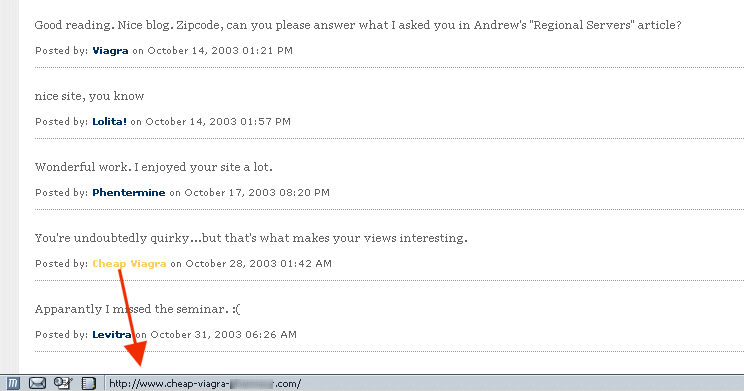
As one would expect, since the “problem” is awfully common, it’s “solution” turned out to be even more so. Enter MT-Blacklist, a “…Movable Type plugin to eradicate comment and trackback spam”.
Bottomline, if you’ve been annoyed by the crappy comment spams on this site, you should be getting some reprieve. Why “some”? As it turns out, I am new to MT-Blacklist. And having spent almost a decade in Information Technology, I know it’s suicidal “not” to be humble about a software’s capabilities (or lack thereof), especially when you’re a rookie at using it. Also, the technology behind MT-Blacklist is “reactive” and claims to mature with time as it learns and adapts to new spammers and their creative (or not) ways of spamming. So, please accept my apologies if a few spams do outsmart MT-Blacklist and find their way on my site. Needless to say, they will be “harshly dealt with” as soon as possible.
For the sake of record, here’s what I did to get MT-Blacklist installed…
MT-Blacklist: Assumptions
- Linux/Unix platform with Movable Type 2.x and Perl 5.x pre-installed
- Perl Storable module already installed
- You MT weblog has been configured to send an email when someone sends a “Trackback” ping or enters a new “Comment”.
MT-Blacklist: Installation notes
1. Download the appropriate MT-Blacklist version
2. Gunzip/untar it into /tmp
3. Put the files in the following locations relative to your main Movable Type directory (abbreviated MT_DIR below) where mt.cgi resides. You may have to create directories if they do not already exist.
MT_DIR/mt-blacklist.cgi      <— Should be in the same directory as mt.cgi
MT_DIR/plugins/Blacklist.pl
MT_DIR/extlib/jayallen/Blacklist.pm
MT_DIR/extlib/jayallen/MTBlPing.pm
MT_DIR/extlib/jayallen/MTBlPost.pm
4. Go to http://<your-website>/mt/mt-blacklist.cgi
5. This is where I tripped up. Make sure that you access the above CGI program as a MT user who has “Create Blog” privileges. If you don’t, you will continue to see “MT-Blacklist is inactive” when you access the “Configure” section of the mt-blacklist.cgi program.
6. Go to the “Add” section and copy the “entire” content of the latest blacklist file. Check the “List” section to make sure that the definitions have indeed been loaded correctly.
7. Go back to the “Configure” section. The changes to made in this section should be self-explanatory. Save it and you should see the “MT-Blacklist is inactive” header be replaced by a simple “MT-Blacklist“.
MT-Blacklist: Test your installation
Enter a comment on any blog entry. You should see the comment emailed to you with MT-Blacklist’s custom footer. If you’ve a saved spam comment, you can try entering that. Either way, it should be trivial to confirm that your weblog is now MT-Blacklist protected.
Note
I would strongly recommend subscribing to Jay Allen’s (MT-Blacklist Author) RSS feeds (RSS 1.0 and 2.0) listing the latest Blacklist changes.
Enjoy!
- Anand
Category: Services and Software