
Cleaning up my Systray using Trillian Pro!
Posted : January 15, 2005 at 2:16 pm [America/Los_Angeles]
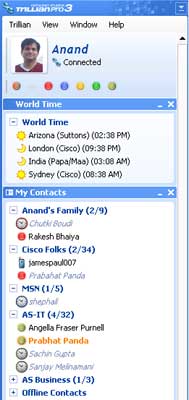
I have been resisting installing Trillian as the client for all my instant messaging needs for a long time. Don’t ask me why. It probably had more to do with the fact that I trusted the “source” software providers more than anything else.
However, with the number of IM clients ballooning in my Systray (Yahoo, MSN and Sametime) and hearing good things about the latest Trillian Pro 3 from my colleagues and even my brother, I decided it was time to take the plunge.
Here’s what I’ve installed so far:
I tried the GMail notifier plugin, but had to dump it in favor of Google’s GMail notifier as it did not really work. Frankly, I would like to get Trillian’s GMail’s notifier plugin working as it would mean one less Systray crap to deal with.
Here are my favorite features of Trillian:
- Single IM Client. Period!
- Activity History across all IMs, even if the IM provider’s software natively does not support Activity History. You can, it seems, also archive Audio and Video chats!
- Configure Trillian to show a systray pop-up when your buddy’s online status changes.
- Plugin friendly Architecture
- Anand
Category: Services and Software
6 Comments
About 5 years ago I used trillian. I thought it was a pretty good app so I put it on my mom’s computer last year when she started using more messengers than just AIM and she likes it also.
Nowdays I just use Kopete on Mandrake 10.1.
Posted by: David M. at January 16, 2005 @ 8:28 am
Anand,
Thanks for sharing this ! I have been wanting to install a single IM client where I can set up my yahoo and sametime buddies, for quite some time. So I was naturally thrilled to read this article on your site :))
I will perhaps install the Trillian Pro 3 and Sametime plug-in on my machine this weekend.
It will be the first time I will be intalling such a tool. Will appreciate it much if you could share any tips or guidelines.
Do we get all the “smileys” that are there in YM with this single client ?
Thank you.
Posted by: Meenu at January 17, 2005 @ 2:14 am
Sorry for the delay in replying to your comment Meenu. If you’ve already installed Trillian by now, you would know that “Trillian” does support all Yahoo emoticons.
Let me know if you need more details on installing the software. It should have been pretty self-explanatory, although it can take some time for a newcomer to get used to the Trillian interface.
Hope it works out for you.
- Anand
Posted by: Anand Sharma at January 20, 2005 @ 2:17 am
Thanks for the tip David. Maybe I will turn my dad onto Trillian too.
Also, will see if I can take Kopete for a test-drive on my FC3 boxes!
- Anand
Posted by: Anand Sharma at January 20, 2005 @ 2:21 am
I have been using it for some time and reporting on it with my blog. I moved into the paid for 2.0 and of course 3.0 and never loked back at running mutiple clients. You can even break accounts into sections for work and personal through sections in the same interface so the contact lists do not get intermingled.
http://www.IdoNotes.com
Posted by: Chris Miller at March 1, 2005 @ 11:22 am
hello…. i have a question… do you know where i can get the world clock plugin for trillian pro? i’ve looked all over the web.. can not find it anywhere… if you have it can you email it to me please.. thank you.
Posted by: chintan at March 19, 2006 @ 8:57 pm