
Domains moved to GoDaddy!
Posted : January 3, 2005 at 12:04 pm [America/Los_Angeles]
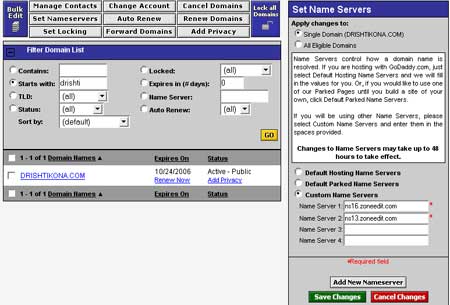
This morning I got an email from GoDaddy confirming that my domains (indrayam.com and drishtikona.com) were transferred to them. In other words, it took less than 48 hrs. for the entire transfer to occur. Not bad. Not bad at all.
Anyway, so here’s what I plan on doing today:
1. Unlock my domains at GoDaddy. By default, they’re transferred in a locked status meaning that I cannot update anything on my domains. What do I need to edit? The Primary and Secondary Nameserver entries for my domains since I am also changing my DNS Hosting Provider to ZoneEdit (free for first 5 zones) from EasyDNS.
2. Create 2 new “zones” in ZoneEdit for my two domains (indrayam.com and drishtikona.com). ZoneEdit will provide me with two Nameservers for each of my domains. These two will act as the “new” Primary and Secondary DNS entries for my domains.
3. Update GoDaddy with the new ZoneEdit Nameservers for each of the two domains (see figure above).
4. Wait for 48 hrs (as recommended by GoDaddy, although I think it propogates fairly quickly) and then use the DNS Query Tool dig to make sure that ZoneEdit Nameservers are indeed the new Nameservers for the two domains.
5. Delete the entries for indrayam.com and drishtikona.com in EasyDNS.
6. That’s it!
Now, since I am not changing IP Address of either of the two domains, I have a feeling that the change will be completely transparent to the end users and there will be NO downtime.
Starting with Step 2 (as shown above) NOW…
Update:
In a few minutes after I updated GoDaddy Nameserver entries, ‘indrayam.com’ was unresolvable. Here’s the error that I got:
[root@zyom common]# nslookup
Note:  nslookup is deprecated and may be removed from future releases.
Consider using the `dig' or `host' programs instead.  Run nslookup with
the `-sil[ent]' option to prevent this message from appearing.
> indrayam.com
Server:         69.55.225.225
Address:        69.55.225.225#53

** server can't find indrayam.com: SERVFAIL
> exit
Contrary to what I had anticipated, there was a blip for almost an hour before things stabilized.
Hmm..Wonder where was I wrong? Any ideas?
- Anand
Category: Services and Software
3 Comments
Does ZoneEdit provide a static IP? I have been wanting to host my site on my own server, but I hear that a lot of websites filter dynamic IP’s to try and cut down on spam and I have DSL that uses dynamic IP. So unless I can find a way to have my mail sent from a static IP, then hosting my site on my own server is out of the question.
Any ideas?
Posted by: David M. at January 4, 2005 @ 7:15 am
David:
Apologize for the procrastination in getting back to you David. Frankly, I am having a bit of a difficulty in understanding this line of yours:
“Does ZoneEdit provide a static IP”
ZoneEdit only offers DNS services as far as I know. However, you can get a static IP from your Broadband provider, provided they offer it. SBC (DSL provider) here in CA does, but Comcast (Cable provider) I think does not. You will have to dig this one up.
Now, as for “..wanting to host my site on my own server..”, well, as you must have seen from my post a few days back, you can use a little DynDNS and Port forwarding magic to host a website at your home (http://indrayam.homeip.net). Now, having said that, I would not recommend that you host a “production” quality site on a dynamic IP. So, here’s what you need to check:
1. Check out if your DSL provider offers static IP and that it’s not too costly
2. Check your default “upstream” speed by going to DSLReports Speed Test site (http://www.dslreports.com/stest) and if your Upstream speed is > 300 kbps range, I think you’re doing pretty good.
That’s it. If #1 and #2 work out, you’re ready to start working on hosting a website at home. If not, you can always host non-critical stuff at home using DynDNS approach.
HTH
- Anand
p.s.
Check out Peter Harrison’s site: http://www.linuxhomenetworking.com. It’s a great site and Peter is also launching a book soon (http://tinyurl.com/68u9s)!
Posted by: Anand Sharma at January 7, 2005 @ 12:56 pm
David:
-Apologize for the procrastination in getting back to you David.
No need to apologize.
-Frankly, I am having a bit of a difficulty in understanding this line of yours:
“Does ZoneEdit provide a static IP”
Some places that offer DNS also offer a permenant IP for E-Mail purposes(at least this is how I understand it) because, more and more companies are filtering dynamic IP’s to try and stop SPAM.
I’m not sure how to explain it. I hope that gave you an idea why I asked the question.
-Check out if your DSL provider offers static IP and that it’s not too costly.
It’s too costly. I can’t get Cable Internet out here where I live yet, so I had to settle for DSL. I checked into a static IP from them and it cost 2x more for 1 static IP than what I was paying for Cable with 2 static IP’s before I moved halfway out in the middle of nowhere.
I used to host davidcentral.net on my own machine before I moved. I quit doing this because I often reboot over to Winblows to play Command and Conquer. But now I have an extra machine, I was going to set that up as a server and host my site on it.
-Check your default “upstream” speed by going to DSLReports Speed Test site (http://www.dslreports.com/stest) and if your Upstream speed is > 300 kbps range, I think you’re doing pretty good.
I like this speed test:
http://us.mcafee.com/root/speedometer/default.asp
Your speed 558.037 Mbps
(69.755 MBps)
Thanks for the reply. If you want, we can continue this discussion via E-mail instead of you having to dig in your archives to post responses.
Posted by: David M. at January 8, 2005 @ 6:18 am