
Using Flickr to handle Photos..
Posted : December 20, 2004 at 6:33 pm [America/Los_Angeles]
From Flickr’s own FAQ:
What is Flickr?
Flickr is the best way to store, sort, search and share your photos online. There is a huge mass of photos in the world, and Flickr provides a way to organize yours, and for you and your friends and family to tell your stories about them.
The best way to learn about it is to upload some photos, explore the site, join some groups and make some friends. There is more information about Flickr and who is responsible on our About Page.
Let’s look at how easy it is to upload your photos using Flickr:
Assumptions:
- You have a bunch of photographs to share.
- You’ve tried PHP and Java based softwares in the past and while they’re great, the initial setup required is too much for you to handle
- You’ve a PC with Windows XP at home and is connected to the internet over a DSL/Cable Modem type connection. A dial-up would work but the uploads would be far too slow.
Steps:
- If you don’t have a Flickr account already, set one up here. It’s free (as in free beer).
- After you’ve created an account, go to the Tools page and download the tool titled “Upload to Flickr via Windows XP Explorer”. You can download it directly by clicking here. If you’re not sure how to install it, just right-click on the link, save it to your disk and then double-click it. For more details on this, click here
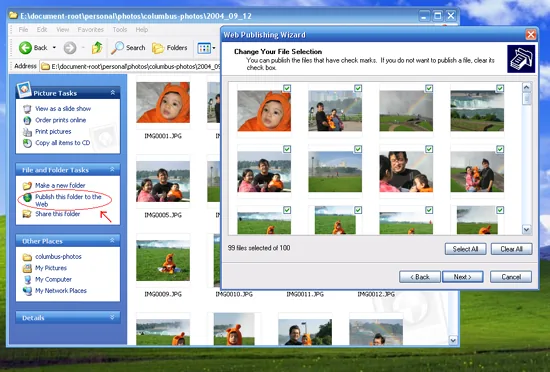
- Once you’ve installed the registry settings (in Step 2 above), double-click on your “My Computer” icon and navigate to the folder that contains the photos you would like to upload.
- Once in the folder, click on Publish the folder to the Web smart link that appears under the File and Folder Tasks common task on the left-hand side (see figure above). If you don’t see the “Common Tasks” section on the left (as shown in the figure above), try this. Open an Explorer folder window. Click on Tools | Folder Options…|General tab. In Tasks, click on the radio button titled “Show common tasks in folders”. Click Apply and Ok.
- The wizard should be really, really simple and self-explanatory.
Once you’ve created your first album, I would strongly encourage you to go into Flickr’s “Your Account” section and try playing around with the options available. The ones that I tweaked were:
1. Your own Flickr Web Page: Setting this will make your URLs look a lot better.
2. Your Blogs: If you plan on posting posted photos to your blog from Flickr directly, configure this section. It’s pretty configurable as this example shows. The only complaint that I have is that Flickr currently does not support setting “Category” for your Movable Type blog posts.
3. Photo Settings: Things that I set were “Default Photo Privacy” and “Photo Licensing”.
Now, the next thing that I need to figure out is how to “moblog” photos captured using Moto V660 cameraphone!
Update (12/20/2004 19:27 PST):
Moblogging a photo is as simple as taking a snap using your cameraphone and sending it to a personal email address provided by Flickr! Will try it later today.
- Anand
Category: Services and Software
4 Comments
Anand,
I find Flickr to be very cool, but only with a “Pro” acct. The “free” accts simply don’t have enough upload bandwith. And the problem with the Pro accts is that I don’t think they’re worth $41.00/year. Doesn’t that seem a little high compared to using an existing website with something like Gallery for posting and managing “online photo albums”?
Could you try to sell me on the $41/yr because I’d like to get an account.
Erik
Posted by: Erik Weibust at December 28, 2004 @ 1:54 pm
Erik:
Good to hear from you again. Seasons Greetings & Happy New Year!!
As for Flickr, I have tried PHP Gallery and JAlbum. As techies, these solutions, though not perfect, work just fine. However, the reason I decided to go with Flickr was:
i. It seemed like a 21st century Gallery solution built from scratch for the “Blogger Generation”, if you catch my drift. It has RSS feeds, Moblogging capabilities, Most viewed, Most Popular, Most Commented type features that one is used to seeing on a blog. In that sense, it’s ready from get go to be integrated into your own blog(s).
ii. It has exceptional desktop tools which make it super easy for even my dad (a non-techy guy) to upload pictures.
iii. I like the whole Flash (and Javascript) driven rich interface of Flickr. Makes things really trivial and slick at the same time.
Does that mean it deserves spending 41 bucks on. That’s really a personal call. All I know is that in this day and age of “digital” content (pictures, music, video) easily running into Gigs, one really needs to really think their “digital universe” through.
Here’s how I am looking at it. I break it down into three levels:
Level 1: Save “raw” files for “future” generations. You can choose an external drive/disks (CDs or DVDs) to save things or you can go for something like a Mirra M-80 (http://www.mirra.com/product/index.html). I may go for a Mirra once I have enough green saved up. External drives or CDs or DVDs seem less user-friendly especially compared to Mirra. Bottomline, we (as the “techies” in the household) must make sure that we put enough thought into this. A screw up in planning for this level can be catastrophic (losing precious memories in the form of photos, movies etc.)
Level 2: With the “raw” files safely tucked away, you need ways to “unleash” some of these raw files into your “virtual” world - download selected songs to iPod, burn your favorite movies into DVD or create online “photo” albums to share with your online “buddies” (family, friends or total strangers). In my case, the goal here has to be ease of use and as less personal fuss for me as possible. I mean, let’s face it: I am already spending too much time making sure my “raw” files are saved. I really would like NOT to have to deal with “Level 2″ too much. I am willing to pay a few bucks a year (ideally in the range of 10 to 20 bucks) to have someone else help me create, enhance and host my “virtual” albums. Flickr definitely fits the bill better for me than PHP Gallery or JAlbum, primarily because I don’t have to do anything!
Take the snap and upload away. The Flickr guys deal with backups, uptime, ease of use etc. etc.
Level 3: With the “raw” files dealt with and online buddies happy, you need a way to show off your collection to your “physical” family members and friends. And that’s where the Kodak kiosks at Walgreens come into play. They help you print your “creme de la creme” photos and create a “traditional” album. Once again, I could buy a printer but I am not sure at this point how cost-effective it will be to deal with replacing cartridges/toner etc.
Hopefully, this would give you some idea of where I am coming from and why I decided to plunk 40 bucks down for the Flickr service.
Posted by: Anand Sharma at December 28, 2004 @ 2:53 pm
Anand,
Happy Holidays and Happy New Years to you, too!
Great points on Flickr and how they fit into the whole digital media world we live in. I agree that their service is really “whiz bang” with the Flash and Javascript based tools/pages. I’m a little scared that their price could go up after the beta and by then I’d be to reliant on their service to not pay the higher fee.
I’ll most likely give them a try. My wife seems to like the “user view” and she is the one who pays the bills at my house, so if she is on-board then I’m in good shape.
Check my site erik.weibust.net in the next couple of weeks to see how my photo sets/ albums are progressing.
Have a good holiday weekend.
Erik
Posted by: Erik Weibust at December 29, 2004 @ 7:03 am
Will do, Erik! Glad to hear that the “CFO” of your household is on board..:-)
- Anand
Posted by: Anand Sharma at December 29, 2004 @ 7:45 am