
HOWTO: Using AWStats, Sourceforge’s June project of the month
Posted : June 25, 2004 at 2:59 am [America/Los_Angeles]
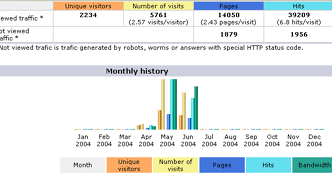
Got an email from Sourceforge.net team announcing that AWStats project was named Project of the month in June. Frankly, I am not surprised at all. I personally use it on more than a few sites and would highly recommend it to everybody.
Here’s a quick-and-dirty HOWTO on using AWStats with Apache2 on Linux. YMMV.
- Setup a user account called ‘awstats’. You will be setting up a few crons under this account.
(root)>useradd awstats
(root)>passwd awstats (set up a password)
- Download the tar/gzipped file:
(root)>wget http://prdownloads.sourceforge.net/awstats/awstats-6.1.tgz
(root)>tar -xvzf awstats-6.1.tgz
cp -r awstats-6.1 /usr/local/awstats
mkdir -p /etc/awstats
- Create a AWStats conf file in /etc/awstats folder. If your site is named mysite.com, name the conf file exactly like awstats.mysite.conf. Of course, you can replace ‘mysite’ with ‘dubya’ for all I care, but you will need this later. So, remember what you use and name the conf file as shown - awstats.mysite.conf
Note:
The config settings you might want to tweak (based on your web server setup) are: LogFile, LogFormat, SiteDomain, HostAliases, DirData (I usually set this up to point to a folder in my web server docroot. for example, /usr/local/apache/htdocs/wwwstats) and DirIcons.
Here’s a sample config file that you can download and tweak to suit your needs. - Create the DataDir folder:
(root)>mkdir -p /usr/local/apache/htdocs/wwwstats/data
(root)>chown -R awstats.awstats /usr/local/apache/htdocs/wwwstats
- Now, we’re all set to setup the cron program. Let’s create a folder for hosting the cron shell script:
(awstats)>mkdir -p /home/awstats/cron
- Download and save this bash shell script in ~awstats/cron as run.sh. Pay special attention to the ‘mysite’ function defined in the script. Notice the -config parameter being passed to both the AWStats Perl scripts. If you used ‘dubya’ in naming conf file in Step 6 above, that’s what goes here!
(awstats)>cd ~awstats/cron
(awstats)>chmod 755 run.sh
- To set it up as cron, create a text file with this line:
0 * * * * /home/awstats/cron/run.sh mysite > /tmp/awstats-mysite.log 2>&1
This ensures that your cron will run at the top of every hour. Feel free to tweak it to suit your needs. Save this as cron.txt in ~awstats/. To add this to the crontab of ‘awstats’ user, run:(awstats)>crontab cron.txt
- Run the cron manually once as follows:
(awstats)>/home/awstats/cron/run.sh mysite > /tmp/awstats-mysite.log 2>&1
(awstats)>cat /tmp/awstats-mysite.log (to look at the output generated by the cron)
If everything worked well, you should have reports generated in /usr/local/apache/htdocs/wwwstats folder - One last thing: You will have to setup a context (as shown below) in your Apache web server httpd.conf file:
Alias /awstats “/usr/local/awstats/wwwroot” <Directory “/usr/local/awstats/wwwroot”> Options Indexes FollowSymLinks MultiViews AllowOverride None Order allow,deny Allow from all </Directory> - Point your browser to http://mysite.com/wwwstats/awstats.mysite.html
NOTE:
You might want to setup an alias for the file awstats.mysite.html called index.html in the wwwstats/ folder. This will make your life a little easier in accessing the stats using something like http://mysite.com/wwwstats - That’s it!
Enjoy!

- Anand
Category: Services and Software
Viewed: 2103 times
4 Comments
Hmm..
Just in time when I needed it.
thAnKs
Posted by: Devesh at June 25, 2004 @ 4:04 am
You’re welcome..:-) Of course, you will have to test these steps out for yourself and hope that they work out well. Would luv to hear if I screwed up somewhere.
Hence the use of YMMV in the post..;-)
- Puchchu Bhaiya
Posted by: Anand Sharma at June 25, 2004 @ 10:25 am
Hi Anand,
Thanks for putting up the HOW-TO.
What would I do different if I was doing it on Windows ?
Thank you,
BR,
~A
Posted by: Anjan Bacchu at June 26, 2004 @ 9:45 pm
Anjan:
I will have to test it out on Windows to tell you whether it even works and if so, what the steps would be..:-(
Fundamentally, it should behave the same way:
1. Configure awstats.mysite.conf and point the LogFile and other entries to the correct place
2. If you look at the shell script, you will notice that running AWStats really boils down to running these two steps:
2a. awstats.pl -config=mysite -update
2b. awstats_buildstaticpages.pl -config=mysite -dir=/usr/local/apache/htdocs/wwwstats/
HTH
- Anand
Posted by: Anand Sharma at June 27, 2004 @ 9:46 am