
HOWTO: Take a screenshot of a scrolling window
Posted : November 18, 2004 at 10:50 am [America/Los_Angeles]

As IT professionals, there are plenty of times when we’re asked to write technical documentations or presentations. Soon you start to realize that keyboard commands like ‘Print Screen’ or ‘Alt+Print Screen’ are indeed very handy tools to have at your disposal. However, if you’ve used these enough, you know that these keyboard commands are pretty limiting, especially when it comes to capturing things like:
- Taking a ‘complete’ screenshot of a window which has a vertical scroll as it’s too big to fit in a screen
- Capturing contextual drop-down menus (such as right-clicks)
- A freehand region (any region) of your desktop
Enter TechSmith’s SnagIt. If you’ve 39 bucks to spare, SnagIt is a really handy tool to have. You can even take this for a test-drive for 30 days before putting a 39 dollar hole in your pocket.
Here are some samples of the amazing things I was able to do using this tool:

Taking a ‘complete’ screenshot of a window which
has a vertical scroll as it’s too big to fit
in a screen
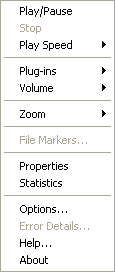
Capturing contextual drop-down menus
(such as right-clicks)
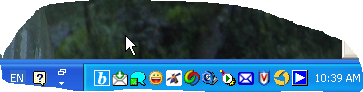
A freehand region (any region) of my desktop (including cursor)
I am sure this tool has plenty more surprises provided I give it the time that it deserves. However, the features listed above were enough to convince me that this tool deserved to have it’s own special place in my IT toolkit, that is, until I lay my hands on a “free” alternative

- Anand
Category: How do I?