
Want to know how many users are on your site right NOW..
Posted : July 12, 2004 at 3:53 pm [America/Los_Angeles]
Not all of the content referenced here, nearly two decades ago, survived the years.
Came across this SourceForge project over the weekend. In a nutshell, this software solution allows you to see in almost real-time how many users are on your site.
The software consists of two parts:
- Flash movie on the client-side
- Java server on the backend side.
Here are some notes on how I set it up on my server:
Assumptions
- You’ve a web server to host the Flash movie
- You’ve Java SDK installed
Installation instructions
- Download the code
(unix-prompt)>cd /tmp
(unix-prompt)>wget http://source.reinvigorate.net/vm/VisitorMonitor.zip
- Uncompress it. Look for a file called visitorMonitor.fla and a folder called VisitorMonitor/classes/visitormonitor
(unix-prompt)>unzip VisitorMonitor.zip
- Move VisitorMonitor/classes/visitormonitor to /usr (or any folder where you generally prefer keeping your installed code)
(root-prompt)>mv VisitorMonitor/classes/visitormonitor /usr/
- Start the Java server:
(unix-prompt)>cd /usr
(root-prompt)>java visitormonitor.VisitorMonitor &
- Setting up the Flash movie is a little more work. If you don’t know Flash, consult your local Flash expert In my case, it was my brother.
- Open the visitorMonitor.fla file in Flash. You can download a 30-day trial version of Flash if you don’t have one. That’s what I did.
- Edit the hostname and port settings as shown below:
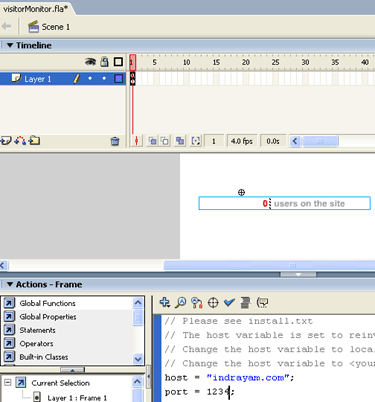
- Save the file and then click File | Publish. This will generate two files in the same folder as visitorMonitor.fla - visitorMonitor.swf and visitorMonitor.html
- Upload the swf file to a web accessible location on your web server. That’s it!
 In my case, it was my
 Enjoy!
Note:
In order to test the real-time behavior, try opening a few windows/tabs and accessing the same URL.
- Anand
Category: Application Development
Viewed: 1076 times
5 Comments
Since you are on javablogs, one would think that you post about java, but I see no articles about Java.
I’m glad that javablogs let you delete blogs that have too much off-topic things.
Posted by: Me at July 12, 2004 @ 7:18 pm
True. It’s nice that javablogs has that feature..;-)
As for Java stuff on my blogs, I do talk about Java related stuff. I am sure you will find plenty of entries on or related to Java, all neatly stashed under “Application Development” category. However, notice that I call the category “Application development” and not “Java”.
Basically, I prefer talking about things that excite me as an IT professional, occasionally peppered with a few personal notes. It’s really that simple.
Apologize if my feeds on javablogs.com have caused you much heartburn, which it apparently has or else you would not have taken the trouble to drop a line
I am kinda surprised you don’t treat even this post as Java related. Hmm..
Posted by: Anand Sharma at July 12, 2004 @ 7:47 pm
You mean to tell me a flash animation cant detect the server & port that it was downloaded from?
Posted by: SKANGA at July 13, 2004 @ 1:33 am
Skanga:
I am not sure I understand your question. The ‘hostname’ and the ‘port’ are part of the ActionScript tied to the Flash Animation. By default, it is set to ‘reinvigorate.net’ and ‘1942′ respectively. Hence the need to change it.
If you’re suggesting that the Flash animation could’ve been written to automatically detect the ‘hostname’ and ‘port’, I must confess that I really don’t know enough about the capabilities of ActionScript.
HTH
- Anand
Posted by: Anand Sharma at July 13, 2004 @ 8:29 am
The Flash doesn’t do any detecting. It’s using the data at das.reinvigorate.net which is already calculating hits and users and dumping it into Flash through Java.
I know some ActionScript, but not Java and am having a devil of a time getting this to work the way I want. When the shell is open and I run the app, it works perfectly, but as soon as I close the shell, it dies. I have appended the & to the command and have tried breaking and running bg, but nothing works! Is this a problem with Java, Apache, Linux, what? My ISP isn’t going to troubleshoot this app with me, so I need to pin down the problem. What would cause the app to stop when I close the shell, even when told to run in the background? Thanks for any help you can give.
Posted by: Timothy Gray at October 30, 2004 @ 4:43 pm