
HTML container tags with CSS overflow: auto. It rocks! That is, if you’re not using IE. Ugh..
Posted : June 13, 2004 at 7:09 pm [America/Los_Angeles]
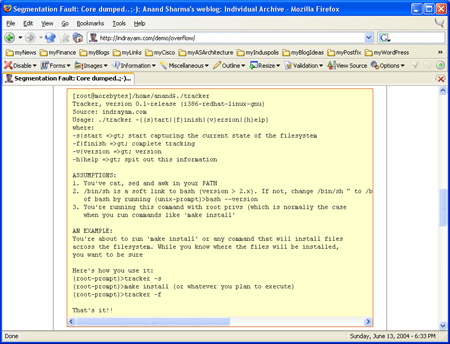
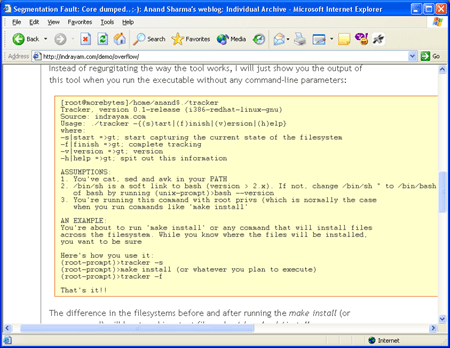
Like many bloggers, I use the PRE tag to post my coding examples. Since I was unaware of the overflow: auto CSS property, posting code samples always involved IMing my brother and a colleague and making sure that my code was not falling off the right-hand side edges of my page.
Thanks to overflow: auto, I have just a little bit more freedom to post code samples and not worry too much about its ramifications on the layout of my site. btw, here’s what my PRE tag now looks like:
pre
{
   font: normal 9pt courier, sans-serif;
   margin-left: 10px;
   margin-right: 10px;
   border: 1px solid #e7651a;
   border-left: 1px solid #e7651a;
   padding: 5px 5px 5px 10px;
   background-color: #FFFFCC;
   overflow: auto;
}
The reason I used the words “..just a little bit more freedom..” in my previous sentence is because my problems are not all solved yet. Turns out, IE does not know how to handle overflow property on sites which are not fixed-width. In other words, if you want IE’s implementation of overflow to work for you, you will have to give your container element a fixed width. If that was not enough, it will automagically bring a vertical scroll bar along with a horizontal one unless (yup, you guessed it right) you specify a fixed height as well.
Ugh..%$#%^&
- Anand
Category: Application Development
3 Comments
Hi,
Is there any way to direct the “pre” tag to specify
different background colors in the rows/columns of a table made by “pre” tag?
Example:
Product ID # Cost
—- -
Television 154t 10
Radio 25r 20
Stereo 345s 30
Thanks for your time.
Posted by: Davoud Tohidy at April 7, 2005 @ 9:44 pm
Hey Anand,
I realize this is quite the old blog post, but I’ve had this problem on my website (coffee-bytes.com) for quite some time as well. It was a hack that took my CSS further from standards compliance, but I did find a solution that was reasonable for me.
On my pre tags, in addition to the ‘overflow: auto’ property, I have put word-wrap: break-word. This is an IE only, non-standard property that causes overly long lines to wrap, rather than causing the PRE to blow out the variable width container, as seen in your screenshot. I have verified this fixes IE, although I haven’t deployed the fix to my website yet as I work on the next iteration of the backend software.
Cheers!
Posted by: R.J. Lorimer at August 10, 2005 @ 2:05 pm
Great stuff!! Will definitely check it out. - Anand
Posted by: Anand Sharma at August 10, 2005 @ 2:08 pm