Life happened. There were plans, detours, work, family—everything that gathers in the quiet space between one post and the next. Seventeen years have passed, and somehow, through all that time, I am back.
Posted : May 5, 2004 at 1:39 pm [America/Los_Angeles]
While writing the actual code was a whole lot of fun, configuring Apache to actually respond to Groovy as CGI programs involved a few hacks (details below). I also wrote a Perl and Python version (along with the Groovy implementation) just to enable folks to get a very high-level comparitive overview. Needless to say, this exercise is purely to get a feel of how “scripty” Groovy is. I have no desire to build Groovy/CGI applications (as the speed difference in the demo links above will show)
So here we go:
Groovy Implementation:
#!/usr/bin/env groovy

stuff = "Hello, Groovy"

# Spitting out standard HTTP Header
println "Content-type: text/htmlnn"

# Using here-docs to generated HTML content
html = <<<OUTPUT
<html>
<head>
<title>Hello, Groovy</title>
</head>
<body background="/images/blue-dash.gif">
<h3>${stuff}</h3>
</body>
</html>
OUTPUT

# Spitting out standard Hello, Groovy
println html
Python Implementation:
#!/usr/bin/env python

stuff = "Hello, Python"

# Spitting out standard HTTP Header
print "Content-type: text/htmlnn"

# Using here-docs to generated HTML content
# Thanks to James for clarifying how to use
# here-docs in Python..:-)
html = """
<html>
<head>
<title>Hello, Python</title>
</head>
<body background="/images/blue-dash.gif">
<h3>%s</h3>
</body>
</html>""" % stuff

# Spitting out standard Hello, Python
print html
Perl Implementation:
#!/usr/bin/env perl

$stuff = "Hello, Perl";

# Spitting out standard HTTP Header
print "Content-type: text/htmlnn" ;

# Using here-docs to generated HTML content
$html = <<OUTPUT;
<html>
<head>
<title>Hello, Perl</title>
</head>
<body background="/images/blue-dash.gif">
<h3>$stuff</h3>
</body>
</html>
OUTPUT

# Spitting out standard Hello, Perl
print $html;
In order to make Groovy CGI Applications work, I had to make two changes:
1. Update the envvars file (in APACHE_HOME/bin) as follows:
# Set JAVA_HOME
JAVA_HOME=”/usr/local/j2sdk1.4.2″
export JAVA_HOME
# Set GROOVY HOME
GROOVY_HOME=”/usr/local/groovy-1.0-beta-4″
export GROOVY_HOME
# PATH
PATH=$PATH:${GROOVY_HOME}/bin:${JAVA_HOME}/bin
export PATH
Posted : May 20, 2004 at 5:22 pm [America/Los_Angeles]
I started blogging the easy way - installed Movable Type, tinkered with it for a few hours and I had my blog up. And while I did customize the default MT template, played with and used a fewMT plugins here and there, converted to using PHP (and it’s include feature) as opposed to plain HTML as my default blog pages and continue to use rich blogging client like w.bloggar to do blog posting (thanks to XML-RPC and support of Blogger API in MT), somehow I never really took a minute to understand some of the internals of the whole process.
In particular, this whole talk of MT supporting Blogger API, metaWeblog API (planning to support Atom API) used to literally make my head spin. In fact, I even remember reading about these APIs a few months back and muttering to myself (ever so silently) “What are these APIs and what in god’s name is making this author so excited about it”.
Well, thanks to my new project and Erik’s “How do I do it? post, I think I am getting to know more about Blogger/Movable Type API and XML-RPC API than I ever would have cared to know
Ok, this past week, it finally dawned on me that I could use the Net::Blogger API in Perl to do posts using my own CGI interface. Why would I want to do that? Well, that’s something I plan to talk about more after my project goes live. Basically, Net::Blogger API makes HTTP calls, talks using XML-RPC protocol with it’s XML-RPC server-side counterpart, which in my case is my blog engine (basically MT) and invokes Blogger API methods (which MT supports). Plain and simple.
However, Erik’s post confused me a little bit. Especially, the following lines:
..I figured I might be able to post directly to my blog, and thus forgo my trusted text editor.
..I grabbed a copy of Apache’s XML-RPC to handle the remote procedure calls thru a Servlet. And used the jTalk SqlQueryBean and Utility classes to handle all of the database work.
..Less than 15 minutes later, I had successfully made my first blog entry via the NewzCrawler Blog Client.
From these lines, it seemed like writing an XML-RPC endpoint which was also Blogger API-compatible was really not that big a deal. I don’t know why, but I was making this thing out to be a really big deal. Something which would probably need a Blogging engine to provide for me
I dumped all my project work, and decided to go figure out what these APIs/Protocol stacks were and how they really worked their magic. After some research, I wrote my first Java based standalone application (using Apache’s XML-RPC) which successfully interacted with my Movable Type’s XML-RPC end-point (/mt/mt-xmlrpc.cgi, by default). While it felt good, I had already done this with Perl, so it really was no big deal. That’s when it struck me:
What if I created a servlet (my very own HelloXMLRPC servlet), make it an XML-RPC Server end point, add a handler to the servlet which stubs a few of the Blogger API methods (like blogger.newPost) and see if I could make an XML-RPC client talk to it accurately.
If I could, I would have just implemented my very own Blogger API compliant XML-RPC end point which could then be invoked from rich clients like NewzCrawler’s Blog This! or w.bloggar.
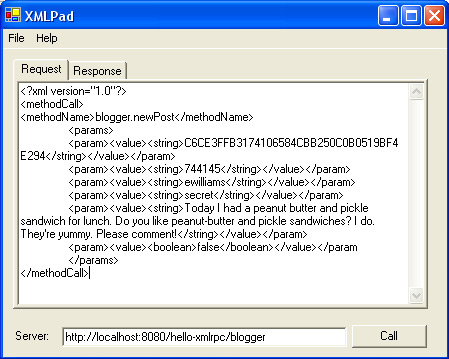
Needless to say, I had a few problems. I had never written an XML-RPC Server, let alone a servlet which implemented that. Also, I had no idea how I would simulate a XML-RPC client call. Well, the second problem was solved, thanks to Andre Torrez’s XMLPad. Thank you Andre! Great job.
Ok, how do I implement the XML-RPC end point? After almost an hour of digging around, I ended up with two very simple pieces of Java code - a very simple servlet (HelloXMLRPC) and a handler code (MyBlogger):
/*
 * HelloXMLRPC.java
 *
 */
package com.indrayam.xmlrpc;
import javax.servlet.*;
import javax.servlet.http.*;
import java.io.*;
import org.apache.xmlrpc.XmlRpcServer;
/**
 * Class description goes here.
 *
 * @author $Author$
 * @version $Revision$ $Date$
 */
public class HelloXMLRPC extends HttpServlet {
    public static XmlRpcServer xmlrpc = new XmlRpcServer();
    public void init(ServletConfig config) throws ServletException {
        xmlrpc = new XmlRpcServer();
        xmlrpc.addHandler(“blogger”, new com.indrayam.xmlrpc.MyBlogger());
    }
    public void doPost(HttpServletRequest req, HttpServletResponse res)
            throws ServletException, IOException {
        byte[] result = xmlrpc.execute(req.getInputStream(), null, null);
        res.setContentType(“text/xml”);
        res.setContentLength(result.length);
        OutputStream output = res.getOutputStream();
        output.write(result);
        output.flush();
    }
    public void doGet(HttpServletRequest req, HttpServletResponse res)
    throws ServletException, IOException {
        doPost(req,res);
    }
}
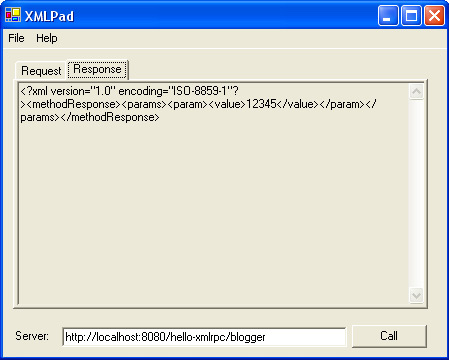
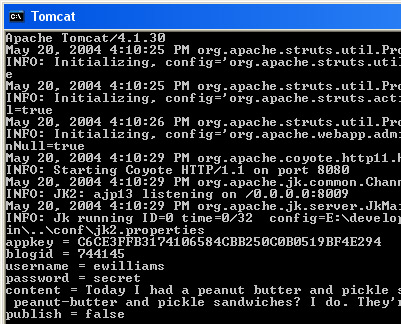
That’s it. Deployed the application, fired up Tomcat and pointed XMLPad.exe to the local XML-RPC end point. The results are below for you to see:
I obviously cannot say for sure if Erik’s “…I grabbed a copy of Apache’s XML-RPC to handle the remote procedure calls thru a Servlet…” is basically a more elaborate version of something like this or it’s just some blogging engine acting as his “ScratchPad” area.
In any case, it sure was fun trying to create your very own servlet acting as an XML-RPC HTTP end point which rich clients like NewzCrawler could directly “post” to. And come to think of it, it really was not that bad
Posted : May 26, 2004 at 9:41 pm [America/Los_Angeles]
I am not a SQL developer by profession, but I know enough to know that it is an incredibly simple and yet extremely powerful data access and manipulation language. And while I must say that I have been fairly impressed with the plethora of QLs like EQL, HQL, myNeighbor’s-QL (just kidding) that have sprung up in the last few years, I continue to find Codd’s SQL (and the myriad flavors of it) far more stable, predictable and powerful for my data access and manipulation needs at this time. However, I am still holding out hope that some day soon I will have my “Eureka” moment vis-a-vis Hibernate and some of the other O/R tools and APIs out there
See, here’s the deal. Pure JDBC code (or the many customized homegrown wrappers) were exciting to use for accessing and manipulating relational data a few years back. However, thanks to SQLExecutor, Spring’s JDBCTemplate, iBatis SQLMaps and many such APIs, there are plenty of nice options out there for folks who want to make things somewhat simpler and cleaner. Not to mention add a bunch of functionalities besides data access and manipulation. For example, caching the Result Set, something that would ordinarily take some coding on the part of the programmer if he/she was working purely in the JDBC realm.
Enter iBatis SQLMaps. Here are some of the things that I have found so far that makes me like iBatis SQLMaps a whole lot:
You seem to have the complete power of your favorite flavor of SQL at your finger tips, including Stored Procedures!
The queries are nicely tucked into separate files (in this case, XML files). See the example configuration file below for a simple example.
In the iBatis world, the way things are laid out is pretty logical, especially to those coming from a pure JDBC background:
Actual SQL query
Parameters that gets passed in to the SQL query for binding (if any)
Results that gets returned from the execution of the Query (if any)
Parameters can be passed as simple Java primitives, Map (like HashMap) or Java Beans
Similarly, Results can be retrieved as a Java Bean, Map (like HashMap) or Java primitives or a collection of either of these.
It integrates nicely with Jakarta’s DBCP connection pooling API
You can configure caching of the results on a query-by-query basis without writing one line of code. As if this was not good enough, you can plug in other implementations of the caching algorithms like OSCache.
Just to give you a taste of just how incredibly trivial it is to take a query and cache it’s results, here’s the queries.xml file of that I am using in sample web application:
<?xml version="1.0" encoding="UTF-8" ?>

<!DOCTYPE sqlMap
    PUBLIC "-//iBATIS.com//DTD SQL Map 2.0//EN"
    "http://www.ibatis.com/dtd/sql-map-2.dtd">

<sqlMap namespace="queries">

  <cacheModel id="cacheFullname" type="OSCACHE">
    <flushInterval hours="1"/>
    <flushOnExecute statement="updateFullname"/>
  </cacheModel>

  <select id="getFullname"
    parameterClass="java.lang.String"
    resultClass="java.lang.String"
    cacheModel="cacheFullname">
      SELECT fullname AS value
      FROM test
      WHERE userid=#value#
  </select>

  <update id="updateFullname"
    parameterClass="map">
      UPDATE test SET fullname = #fullname#
      WHERE userid=#userid#
  </update>

</sqlMap>
This file defines the two queries that I am using in my sample application: One which does a SELECT and the other which does an UPDATE. Notice how a cacheModel was defined (cacheFullname) and then assigned to the SELECT query (getFullname) by the use of cacheModel attribute in the <select> tag. So, what does this buy us? It ensures that when I invoke the ‘getFullname’ query (as part of a web request via Velocity pages, in my case), the result gets cached using OpenSymphony’s OSCache library. If you wanted to use the default LRU or FIFO caching algorithms that comes as part of iBatis, you would simply replace the type=OSCACHE with type=LRU or type=FIFO. It’s that easy.
So far so good. But how do I flush the cache, you ask? Well, in this example, there are two ways the cache will get flushed:
It will get automatically flushed in an hours time or
It will get flushed when someone invokes the update statement ‘updateFullname’.
Needless to say, you could have your own little custom way (providing a ‘Refresh’ button on the UI screen) of flushing the cache thereby giving your end users the ability to perform a flush, if they felt that the data was stale.
If you think about this for a second, I am sure you will see how simple and extremely powerful this implementation is.
This alone would warrant you to take iBatis for a ride if you haven’t done it already. If you’re convinced, download this sample web application, unzip it, read the README.txt and you should be ready in less than 5 mins to see iBatis SQLMaps and OSCache in action. Just for your benefit, here’s a slightly embellished version of what the README.txt file looks like:
README
======
Assumptions:
---------------
1. You've access to a database, preferably MySQL. Of course, PostgreSQL, Oracle or DB2
would work just as well.
2. You've a Tomcat setup
3. You've some experience with JDBC programming
Posted : November 22, 2004 at 7:09 pm [America/Los_Angeles]
Almost 6 months back, I had written an entry on some of the differences that I found between Oracle and MySQL as I was getting to know more MySQL. This afternoon, while dabbling with some more MySQL, I found a few more things that I thought I would point out, especially pertaining to using MySQL’s mysql vs. Oracle’s sqlplus
Let’s take a simple Oracle SQL script (save it as run.sql):
set echo on;
droptable customers;
createtable customers
(
customerid numbernotnullprimarykey,
name varchar(11)notnull,
address varchar(100)notnull,
city varchar(30)notnull
);
droptable orders;
createtable orders
(
orderid numbernotnullprimarykey,
customerid number notnull,
amount number(6,2),
orderdate datenotnull
);
droptable books;
createtable books
(
isbn varchar(13)notnullprimarykey,
author varchar(50)
title varchar(100),
price number(6,2)
);
Upon execution, it gives the following result:
SQL> @E:run.sql;
SQL>
SQL> drop table customers;
drop table customers
           *
ERROR at line 1:
ORA-00942: table or view does not exist

SQL>
SQL> create table customers
  2  (
  3   customerid number not null primary key,
  4   name varchar(11) not null,
  5   address varchar(100) not null,
  6   city varchar(30) not null
  7  );

Table created.

SQL>
SQL> drop table orders;
drop table orders
           *
ERROR at line 1:
ORA-00942: table or view does not exist

SQL>
SQL> create table orders
  2  (
  3   orderid number not null primary key,
  4   customerid number not null,
  5   amount number(6,2),
  6   orderdate date not null
  7  );

Table created.

SQL>
SQL> drop table books;
drop table books
           *
ERROR at line 1:
ORA-00942: table or view does not exist

SQL>
SQL> create table books
  2  (
  3   isbn varchar(13) not null primary key,
  4   author varchar(50),
  5   title varchar(100),
  6   price number(6,2)
  7  );

Table created.

SQL>
Anyone who knows a thing or two about SQL can look at this interaction and come to a conclusion about whether the script went well or failed.
A quick-and-dirty translation of the SQL above into MySQL’s flavor resulted in this (save it as run1.sql):
droptable customers;
createtable customers
(
customerid int unsignednotnull auto_increment primarykey,
name varchar(11)notnull,
address varchar(100)notnull,
city varchar(30)notnull
);
droptable orders;
createtable orders
(
orderid int unsignednotnull auto_increment primarykey,
customerid int unsignednotnull,
amount float(6,2),
orderdate datenotnull
);
droptable books;
createtable books
(
isbn varchar(13)notnullprimarykey,
author varchar(50),
title varchar(100),
price float(6,2)
);
So, what’s different? Well, other than replacing all instances of number and number(x,y) from Oracle’s SQL script with MySQL’s int and float respectively and removing sqlplus-centric command like set echo on, it was really not much. So far so good.
However, if you try running this script using mysql (assuming you already have a MySQL user account and database with relevant privileges), your interaction will be perfunctory at best:
E:>mysql -D books -u anand -p < "E:run1.sql"
Enter password: ****************
ERROR 1051 (42S02) at line 1: Unknown table 'customers'

E:>
Well, that was dumb. Ofcourse there isin’t a ‘customers’ table. Can’t you just skip that error and just move on? Turns out, by default, mysql won’t. However, it has an option –force, -f which will solve our problem. Here’s what our interaction looks like with -f added:
E:>mysql -D books -f -u anand -p < "E:run1.sql"
Enter password: ********
ERROR 1051 (42S02) at line 1: Unknown table 'customers'
ERROR 1051 (42S02) at line 11: Unknown table 'orders'
ERROR 1051 (42S02) at line 21: Unknown table 'books'

E:>
While it worked, notice that the output is not too user-friendly. How do I know if the script worked or failed? After running my script, I had to login and run show tables to confirm that it had indeed worked. It was far cleaner in Oracle where the transcript of the session (thanks to set echo on) was pretty obvious.
So, after some more monkeying around with mysql’s command-line options, I was finally able to come up with an interaction which was almost like Oracle’s:
E:>mysql -D books -f -v -v -u anand -p < "E:run1.sql"
Enter password: ***********
--------------
drop table customers
--------------

ERROR 1051 (42S02) at line 1: Unknown table 'customers'
--------------
create table customers
(
 customerid int unsigned not null auto_increment primary key,
 name varchar(11) not null,
 address varchar(100) not null,
 city varchar(30) not null
)
--------------

Query OK, 0 rows affected

--------------
drop table orders
--------------

ERROR 1051 (42S02) at line 11: Unknown table 'orders'
--------------
create table orders
(
 orderid int unsigned not null auto_increment primary key,
 customerid int unsigned not null,
 amount float(6,2),
 orderdate date not null
)
--------------

Query OK, 0 rows affected

--------------
drop table books
--------------

ERROR 1051 (42S02) at line 21: Unknown table 'books'
--------------
create table books
(
 isbn varchar(13) not null primary key,
 author varchar(50),
 title varchar(100),
 price float(6,2)
)
--------------

Query OK, 0 rows affected

Bye

E:>
Much better. Definitely far more informative and user-friendly output.
Now, let’s zero-in on the various command-line options and what they mean:
The -D books specifies the database that the script will work on
The -f forces mysql to continue executing the SQL script despite errors
The -v -v (double -v) is for “more” verbose output. Try the command with just one -v and you will know why we need two -v
The -u anand specifies the userid that mysql will attempt logging in as
The -p tells mysql that it should prompt for a password in order to authenticate the user
On a side note, mysql sorta supports sqlplus’sspool command. During an interactive mysql session, you can use tee <filename> and notee options and it will work very similar to spool <filename> and spool off respectively. However, this does not seem to work when you run a batch SQL file
Bottomline, if you’re a frequent user of MySQL’s mysql client tool, hope these options taught you something new today. It sure was new to me
Note:
MySQL supports DDL statements that look like:
CREATE TABLE IF EXISTS customers;
This would have also solved our problem where ‘mysql’ seems to die when trying to run the MySQL sql script (shown above) for the first time. However, using -f (or –force) seemed somewhat simpler.